
A rhyme can connect two ideas, create an expectation, or make the end of a line feel inevitable. Start with what you want to say, and let the sound help you get there.
Search by sound
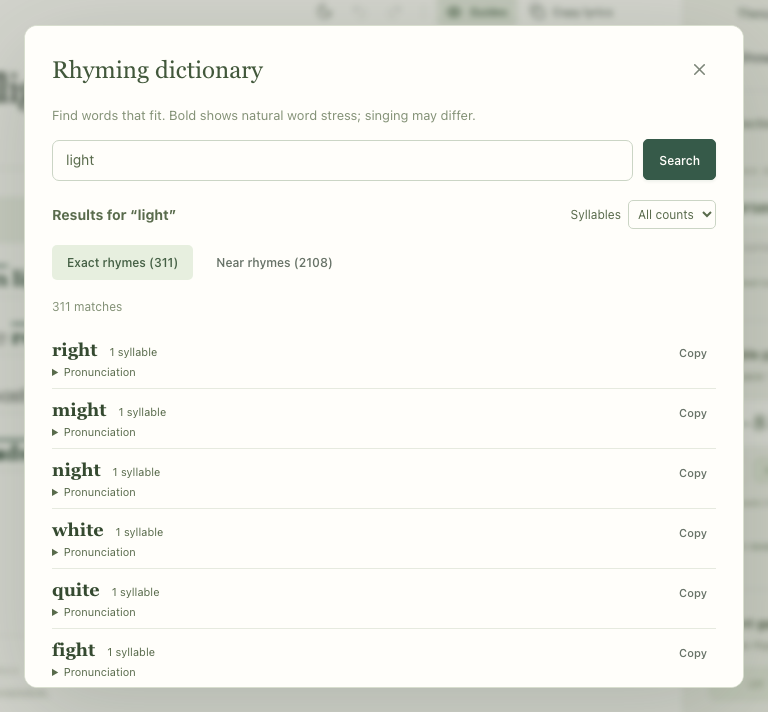
Open Rhyming dictionary in the studio’s word tools. Enter an English word and press Enter or Search. Exact rhymes share the ending sound from the final stressed vowel onward. For example, “light” and “night” rhyme even though their spelling does not tell the whole story.
Leave room for a near rhyme
Near rhymes share some sound without matching the full ending. Kdenz shows close matches first; Explore broader matches adds looser suggestions. Pronunciation details help explain a match. Try each candidate aloud in the phrase: a useful near rhyme depends on your delivery as well as its dictionary sounds.
Fit the word to the line
- Use the syllable filter if your phrase has room for a particular word length.
- Inspect the pronunciation when a word has alternative readings.
- Use Copy to bring a candidate back to your draft. Searching never replaces your lyrics automatically.
- Turn on Show end rhymes to see matching line endings within a section. Activate a numbered badge to inspect the group.
Change the idea’s wording when you need to
If every rhyme feels forced, try the Thesaurus. Its synonyms are grouped by meaning and part of speech. A synonym that fits one sense may be wrong for another, so read the definition and keep the sentence’s meaning in view.
You can also move the thought to an earlier part of the line, change the ending word, or leave the line unrhymed. The goal is a phrase you want to sing.