
Kdenz keeps your current song in this browser. You can start without an account, but a downloaded project is the way to keep a backup you control.
Understand local autosave
The studio autosaves the current song, including its section settings, to browser storage. Reopening the studio at the same website address, in the same browser profile, restores it. Kdenz keeps one current song; it is not a cloud song library.
Private browsing, clearing site data, changing devices, or moving to another browser or domain can make that saved workspace unavailable. Browser storage is not a permanent backup.
Download a project before you need it
- Choose Save project, or press Cmd/Ctrl+S in the studio.
- Keep the downloaded .lyrics.json file somewhere you can find it. It preserves your lyrics and section settings.
- To restore it, use File → Open project or text. Opening another song replaces the current workspace, so save the current song first.
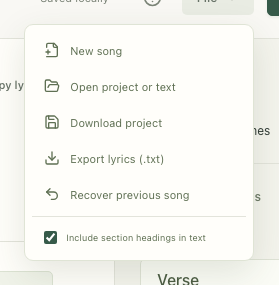
Use Export lyrics (.txt) or Copy lyrics for a clean text version. Text export omits the analysis decorations and does not preserve all project settings.
Prepare for offline writing
Open the studio while online and wait for Ready offline in the footer. The initial download includes the pronunciation and word dictionaries and is roughly 31 MB before HTTP compression. Once ready, the editor, rhyming dictionary, and thesaurus can work offline.

A slow connection or limited browser storage may prevent offline preparation from completing. Confirm the ready message and try an offline reload before relying on the app away from a connection.
What stays in your browser
Kdenz does not upload your lyrics or word-tool queries. Analysis and dictionary searches run on your device. Browser-provided spellchecking follows your browser’s settings and may use its own service.