
A syllable count is a useful starting point when a lyric almost fits a melody. It helps you notice where a line is crowded, and where you have space to breathe.
Start with a line you can sing
Say your line aloud, then sing it against the phrase you have in mind. Count the spoken syllables first. A held note can stretch one syllable over several beats; the syllable count and the number of musical beats are different things.
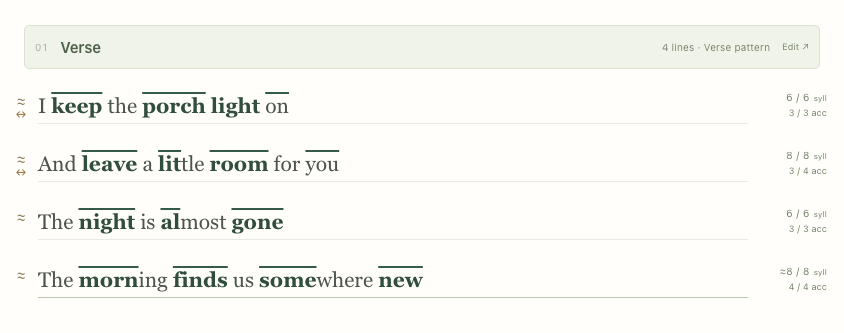
I keep the porch light on 6 syllables
And leave a little room for you 8 syllables
Try a repeating pattern in Kdenz
- Open the studio and select a section header, such as Verse.
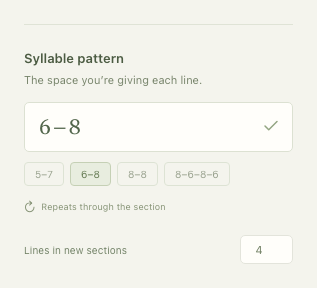
- In Syllable pattern, enter 6–8 and apply it. The target alternates between six and eight syllables through the section.
- Type your lyrics. The counter beside each line shows the actual count followed by the target: 7 / 6 means seven syllables against a target of six.
- Read a crowded line aloud. Try removing an unnecessary word, changing the phrase, or giving the line a different target.
Keep a chorus consistent
Sections with the same type share their pattern. Set the pattern for one Chorus and the linked Chorus sections follow it. Use Customize when a particular section needs its own shape, and Reconnect to restore the shared pattern.
Listen when the number surprises you
Kdenz uses North American English pronunciations. Some words have more than one reading, and unfamiliar spellings may use an estimate. Alt-click a word (Option-click on Mac), or use the ≈ control beside a line, to inspect its pronunciation. The app does not choose a pronunciation just to make your line fit.
A count is a guide. If a contraction, regional pronunciation, or deliberate stretch makes a line work when sung, use your ear to make the final decision.